
Overwiew and KPIs
KPIs play a crucial role in organisations, providing a compass to navigate toward success. Let's dive into KPIs for Finance and how Copilot can assist.

Best Practices and Strategies Copilot as your AI assistant
Copilot can assist financial experts by providing real-time data analysis and insights, enabling them to make informed decisions quickly. With advanced predictive analytics, Copilot can forecast market trends and identify potential risks, allowing professionals to stay ahead of the curve.
Additionally, Copilot’s ability to automate routine tasks frees up valuable time, so financial experts can focus on strategic planning and execution. This comprehensive support ensures that financial professionals can navigate the complexities of the market with confidence and precision. Explore key Finance scenarios and discover how Copilot can be your AI assistant throughout the process.
Microsoft Copilot for Finance is a new Copilot experience for Microsoft 365 that unlocks AI-assisted competencies for financial professionals, right from within productivity applications they use every day.
KPIs play a crucial role in organisations, providing a compass to navigate toward success. Let's dive into KPIs for Finance and how Copilot can assist.

See how real-life Finance employees are using Copilot in their day to day.

Copilot can simplify the tasks that execs perform every day. Look at key use cases and how Copilot can be your AI assistant along the way.

In the current fast-paced landscape, financial experts need to be both sharp and rapid in their decision-making to drive business growth. The combination of quick thinking and strategic insight is essential for achieving best results. AI is revolutionising essential financial tasks like budgeting, forecasting, financial analysis, and corporate performance management.

- Optimise your financial operations
- Collections coordination
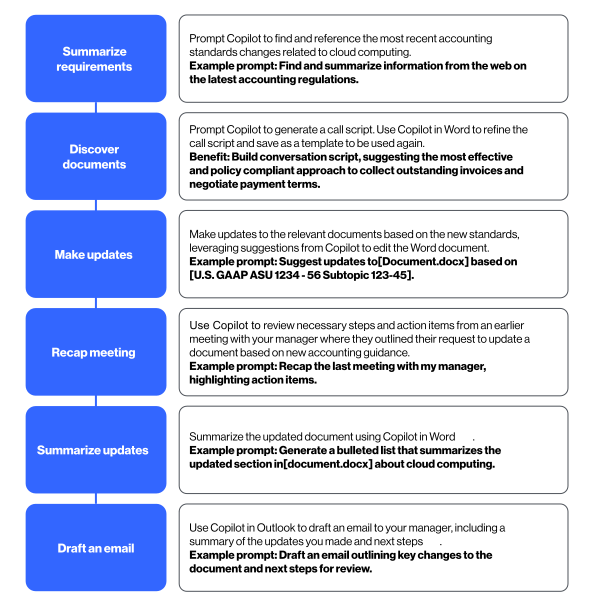
- Contract accounting guidance
- Accounting document evaluation
- Financial insights
- Procurement insight acceleration

- Accountant
- Analyst
- Auditor
- Operations
- Procurement

Improve billing and collections processes by enhancing communications with customers and vendors.

Copilot can be extended into ERP systems and other processes to bring data together and speed decision-making without performing expensive updates to financial systems.

Automate simple tasks that may currently be outsourced or performed by low-level employees.
Copilot significantly enhances the achievement of financial KPIs by automating data collection and analysis, ensuring accuracy and reducing errors. It provides real-time insights into KPI performance, enabling better decision-making and strategic planning. Additionally, Copilot streamlines financial processes, increasing productivity and ensuring compliance, ultimately driving KPI success and organisational growth.
Budget Analyst | Financial Planner | Treasury Manager| Risk Manager | Controller | Data Manager| Strategic Planner

Copilot for Microsoft 365 | Copilot for Finance
As a cost centre, Finance teams face the challenge of constantly achieving more with fewer resources. By assisting with everyday tasks, Microsoft Copilot can help increase time for additional analysis, proactive audits, collections processes, and financial reporting.
Keep communication lines open
Reduce outsourcing requirements
Avoid spend on finance system updates
Microsoft Copilot can help with lowering resolution times which in turn leads to increased agent productivity and higher customer satisfaction rates.
Boost productivity
Speed data analysis and reporting
Average resolution time can require input from:
-Analyst
Copilot for Microsoft 365 | Copilot for Finance
Collections play a crucial role in any business. Timely and efficient collections help ensure healthy cash flow, liquidity, and operational efficiency.
Collection Manager
Copilot for Microsoft 365 | Copilot for Finance
Improve collections process
Improve customer meetings
Finance teams grapple with complex tasks—from credit and collections to risk management and compliance. Get real-time insights and strategic recommendations.
By automating mundane tasks, Microsoft Copilot frees up time for critical decisions, streamlining audits, simplifying collections, and accelerating financial reporting.
Speed data analysis and reporting
Budget Analyst | Risk Manager | Compliance
Copilot for Microsoft 365 | Copilot for Finance | Copilot Studio
Finance Analyst | Executive Leadership
Copilot for Microsoft 365 | Copilot Studio | Microsoft Copilot | Microsoft Copilot for Finance
Microsoft Copilot can be extended into processes to bring data together and speed decision-making without performing expensive updates to financial systems.
Inform your decisions
Improve your data
As the global economy becomes a place of constant and unpredictable change, it is critical for CFOs to play a more strategic role in their organisations and become innovation allies.
According to the 2023 Future of Finance Trends Report, 81% of finance leaders feel it is a high priority for them to make change happen in the organisation by setting long-term organisational KPIs, such as investing in the right tools, prioritising purpose investments, and increasing job satisfaction.
In moving from a position buried by transactional tasks to one at the forefront of visionary innovation, CFOs will have completed a radical transformation into the hero their organisations need to truly thrive.
Based on the recent Gartner CFO Report, 79% of chief finance officers will personally lead digital transformation for their function through 2024 to adapt and thrive in the face of uncertainty. However, many finance leaders simply don’t know where to start in a rapidly evolving finance technology landscape. They face challenges in creating a comprehensive and realistic technology strategy and roadmap that balances new capabilities with existing legacy requirements.
CFOs often encounter several challenges when leading digital transformation initiatives. Here are some of the most common ones:
Finance organisations need to be utilising generative AI to help blend structured and unstructured datasets. Copilot for Finance is a solution that aggressively targets this challenge. Microsoft continues to push the boundary of business applications by providing AI-driven solutions for common business problems. Copilot for Finance is another powerful example of this effort. Copilot for Finance has potential to help finance professionals at organisations of all sizes accelerate impact and possibly even reduce financial operation costs.1
—Kevin Permenter, IDC research director, financial applications
of finance leaders currently feel the challenge of not having the automation tools they need to automate repetitive tasks (e.g., digital invoicing software, online payroll) and free up their time for more innovative work, the growing appetite for finance‑first innovation is an unmistakable sign of the need for a culture shift.
The first step in adapting AI for your financial department should be to try out the technology to get a feel for what it can do—and understand its current limitations. Experiencing the technology firsthand enables CFOs to gain a clearer understanding of generative AI and to more swiftly identify near- and immediate-term opportunities 2.
Microsoft Copilot for Finance Preview provides AI-powered assistance while working in Microsoft 365 applications, making financial processes more streamlined and automated. Copilot for Finance can streamline audits by pulling and reconciling data with a simple prompt, simplify collections by automating communication and payment plans, and accelerate financial reporting by detecting variances with ease. The potential time and cost savings are substantial, transforming not just how financial professionals work, but how they drive impact within the organisation3.
According to the McKinsey Global Institute, generative AI has the potential to contribute between $2.6 trillion and $4.4 trillion annually across various industries, based on their analysis of 63 different use cases.
Top CFOs lead innovation by continuously learning about new technologies and preparing businesses for rapid evolution. Although it may seem unconventional for CFOs to champion visionary innovation, it’s crucial for achieving significant growth. They should leverage their relationships with leaders to explore generative AI opportunities and follow up consistently. Upskilling and empowering their teams to build key relationships and understand innovation assumptions is essential.
Here’s how finance professionals say AI would improve their performance the most 4.
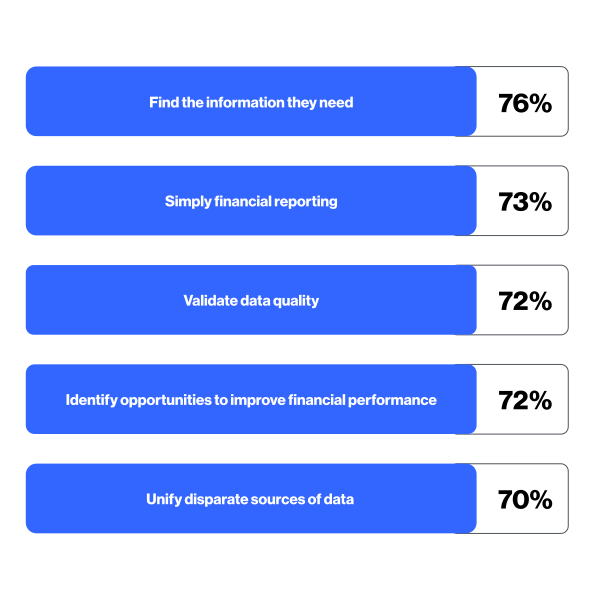
Boost value through consistent usage and personal productivity, optimising functional workflows, and impacting the metrics that are vital to your organisation. Streamline Finance processes to enhance efficiency and drive better results. Utilize data-driven insights to make informed decisions that align with your strategic goals.
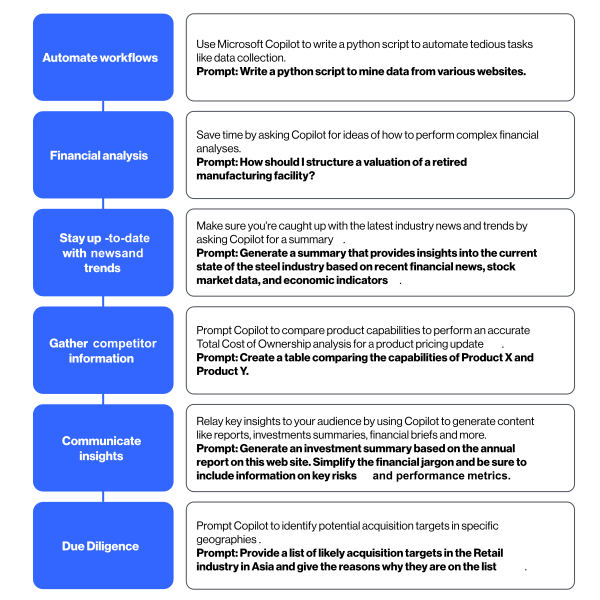
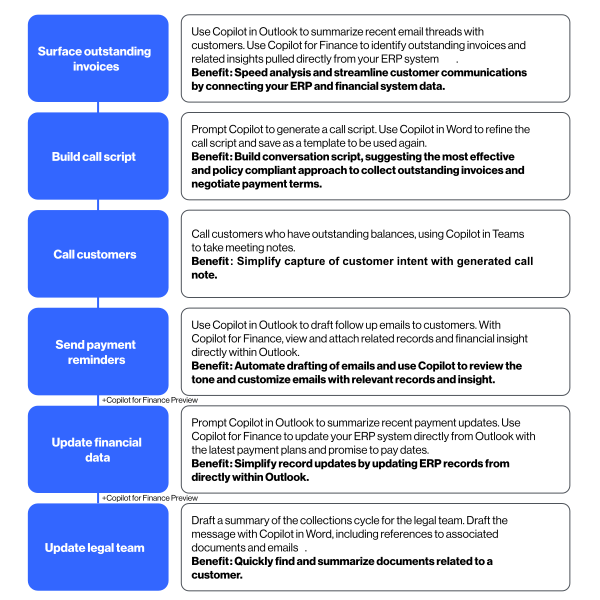
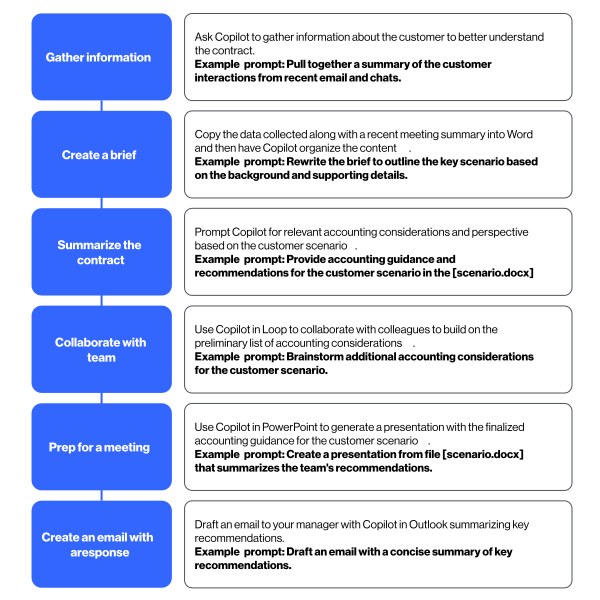
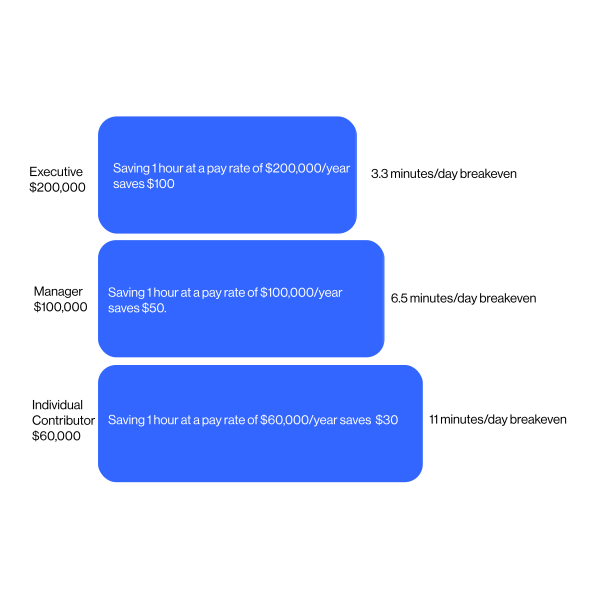
Using Microsoft Copilot to streamline everyday tasks can reduce complexity, save time, and boost employee satisfaction. Discover how Copilot can be your AI assistant throughout the process.
Excel is the #1 tool for finance departments worldwide, known for its powerful data analysis and reporting capabilities. By using Copilot in Excel, you can take your financial tasks to the next level. Our guide will demonstrate how to use prompts effectively to achieve the best results.
| 1. Add Calculation Columns | 2. Currency Conversion | 3. Conditional Formatting | 4. Sort and Filter for Top Results | 5. Add Calculation Columns | 6. Create Visual Representation | 7. Conditional Formatting |
| Task: Create a new column to calculate percentages based on existing data. | Task: Automatically convert prices into a specified local currency. | Task: Apply conditional formatting to highlight important data visually. | Task: Sort data by specific criteria and filter key rows to focus on top performers. | Task: Quickly compute average values for specific columns. | Task: Generate a visual summary of data using a pie chart. | Task: Compare data points from two columns over a time period using a line graph. |
| Prompt: "Add a column for the percentage of [Column Name]."l | Prompt: "Add a column showing price in [Local Currency], with current price [Price]." | Prompt: "Add green-yellow-red conditional formatting to [Column Name]." | Prompt: "Sort by [Column Name] from biggest to smallest."; | Prompt: "What is the average of [Column Name]?" | Prompt: "Create a pie chart of view count by Category." | Prompt: "Create a line graph comparing [Column 1] and [Column 2] over time." |
| Benefit/Outcome: Automatically calculates percentages for each row, saving time and reducing errors while enabling better performance comparison and analysis. | Benefit/Outcome: Facilitates analysis across different markets by displaying prices in a local currency, helping in accurate financial reporting and decision-making | Benefit/Outcome: Allows for quick identification of data patterns or outliers by using colours to highlight values that meet certain thresholds, improving visibility of performance indicators. | Benefit/Outcome: Orders data to showcase high-priority values, enabling focused analysis of top performers. | Benefit/Outcome: Simplifies complex data into a visual format, making it easier to communicate insights and data distribution across different categories. | Benefit/Outcome: Visualizes trends and relationships between key data points, offering insights for performance tracking and strategic planning over time. | Benefit/Outcome: Visualizes trends and relationships between key data points, offering insights for performance tracking and strategic planning over time. |
| Follow-up Task: Filter and focus on top-selling products with the best price. | Follow-up Task: Analyze price trends by grouping data by month. | |||||
| Prompt: "Filter top 10 rows for [Product Names] with highest Sold and lowest Price." | Prompt: "Show the average price per month in Release Date." | |||||
| Benefit/Outcome: Narrows down the dataset to key products, streamlining analysis and decision-making regarding sales and pricing strategies. | Benefit/Outcome: Helps identify trends in pricing over time, aiding in demand forecasting and product lifecycle analysis. |
Microsoft Copilot enhances variance analysis and data reconciliation for financial professionals by automating these tasks, saving time, and improving report accuracy.
Copilot assists in identifying discrepancies, analysing variances, and ensuring data integrity. Copilot’s advanced AI-driven insights can provide a robust foundation for accurate forecasting and strategic decision-making.
Data reconciliation in Copilot for Finance simplifies the process of reconciling two data sets in Excel workbooks. You can define the data to reconcile, use AI to determine the reconciliation rules, and benefit from a comprehensive report that provides a generative AI summary of the results of the reconciliation process.
Example: Automate the comparison of daily transactions with bank records. Copilot organises your data into three distinct categories: unmatched transactions, potentially matched transactions, and matched transactions. Additionally, you will have the option to download a PDF summary of the reconciliation process.
Copilot for Finance assists financial analysts in efficiently performing a variance analysis in Excel by utilising natural language prompts to scrutinise datasets for anomalies, risks, and unmatched values. This analysis empowers finance teams to deliver planned and calculated insights to entrepreneurs regarding financial performance relative to strategic results.
Example: Identify discrepancies like unexpected expenses or revenue shortfalls effortlessly by simply instructing Copilot for Finance to analyse Excel sheets.
Predictive analysis is an essential technique in financial data analytics, utilising historical data to forecast future trends and outcomes. Copilot for Finance connects directly to Dynamics 365 and SAP, and can be connected to more than 1,200 other systems via Copilot Studio, a development application for extending Microsoft Copilots. When integrating Copilot and Power BI, financial professionals are equipped with a comprehensive platform to conduct sophisticated predictive analysis.
Example: Utilize Copilot for predictive analytics to forecast future cash flows based on historical data or forecast when customers will make payments for their invoices.
In the past year, Microsoft Copilot has been adopted by hundreds of companies worldwide, driving significant AI-powered transformations. These advancements have delivered measurable business value and notable outcomes.
Last year Microsoft introduced the term “AI Transformation.” It’s remarkable to think that back then, Copilots were not widely available, and the Azure OpenAI Service had only been around for six months. As Satya Nadella, Microsoft Chairman and CEO, mentioned in the last quarter’s earnings report, 60% of the Fortune 500 companies have now adopted Copilots, and 65% are using the Azure OpenAI Service. Today, Copilot is at the forefront of how AI is driving human achievement 5.
Fintech company Saphyre creates real-time client account reconciliation and management solutions for institutional parties involved in financial trading. The company is using Microsoft Azure to provide intelligent, cloud-based solutions that automate and streamline complex financial trading workflows and modernise time-consuming processes efficiently and securely. Using Azure AI, Saphyre built a solution that helped clients reduce manual paperwork by 75%. It is also sharing data more securely using Microsoft security products so clients can be ready to trade three to five times faster compared to manual onboarding. This results in increased revenue opportunities for clients by completing trades more quickly and at better prices.
As an integrated risk assessment firm operating globally, Moody’s Corporation has harnessed the power of AI through Azure OpenAI Service, Microsoft Fabric and Microsoft Teams to significantly enhance productivity and insights. Through our co-innovation efforts, we built an internal tool — Moody’s Copilot — that enables employees to quickly synthesize vast amounts of research and data, and 94% of users reported increased productivity. Additionally, the launch of Moody’s Research Assistant allows customers to generate new insights from extensive credit research, data and analytics, potentially saving users over 25% of their time on typical financial analyst tasks.
EY is using Copilot for Microsoft 365 to help clients adopt an AI-powered approach to tackle their unique tax, finance and operational challenges; boost efficiency; and get more value from their data. Reconciling and combining large amounts of data faster and more accurately is a game changer for Finance and Tax, driving a differentiated experience and opportunity to deliver these capabilities through EY’s core platforms and solutions. The ability to apply Copilot to vast swaths of data to develop insights helps drive smarter decision-making across the business. For example, EY professionals are seeing productivity gains of up to 14 hours per week using an AI digital assistant to automate routine tasks, freeing up time for more strategic work. The initial rollout of Copilot was so positive that EY is now scaling it to 150,000 of its employees and helping clients drive their own transformations using EY’s Customer Zero copilot accelerators.
Copilot early users said they were more productive
Copilot early users said they were more productive
Said they didn’t want
to give it up
Discover the latest SoftwareOne Copilot Case Studies. Learn how companies have successfully leveraged SoftwareOne’s expertise for AI integration, enhancing productivity and competitiveness with Microsoft Copilot.

To enhance operational efficiency and maintain a competitive edge, Verdane, one of the Nordic’s largest private equity firms, embarked on an AI integration journey. Teaming up with SoftwareOne, Verdane sought to leverage the transformative power of Microsoft Copilot. This collaboration aimed to streamline processes, empower teams, and revolutionise the way Verdane conducts market research, pitches to potential partners, and ultimately, solidifies its position as an industry leader in sustainable investments.
A global leader in industrial engineering, Spirax Group sought our help to enhance its colleague experience by addressing inefficiencies in how employees managed documentation, meetings, and information retrieval. With a workforce spread across multiple continents and time zones, the challenge was not only to help Spirax Group colleagues work more productively, but also to ensure that teams could collaborate more effectively, regardless of their location.
Outcomes
Preparing Your Organisation for Implementation
As organisations increasingly adopt AI-powered tools like Microsoft Copilot, ensuring data security becomes paramount. Microsoft Copilot integrates with Microsoft 365 Apps and uses large language models (LLMs) to enhance productivity. However, this integration raises valid concerns about data privacy and security. Here’s how to address these concerns and prepare your organisation for a seamless implementation of Microsoft Copilot.
Implementing Microsoft Copilot can significantly boost productivity and efficiency within your organisation. However, addressing data security concerns is crucial to ensure a safe and compliant environment. By adopting robust security measures and preparing your organisation thoroughly, you can leverage the full potential of Microsoft Copilot while safeguarding your data.
Microsoft Copilot for Microsoft 365 documentation
Data, Privacy, and Security for Microsoft Copilot for Microsoft 365

Share a few details about your business challenge, and we’ll get right back to you.
Share a few details about your business challenge, and we’ll get right back to you.