



Sales mastery with Copilot:
Sales mastery with Copilot:
AI-Powered sales excellence best practices and strategies
Selling is a challenging endeavor. Sales professionals often find themselves overwhelmed with administrative duties that drain their valuable time and energy.
Microsoft Copilot for Sales is assisting sellers with their most tedious tasks, like preparing for meetings, writing emails, and surfacing relevant information so they can focus more time on closing deals.
Copilot for Sales brings together Microsoft 365 Copilot with a role-based agent that connects with your CRM platform to bring sales insights and generative AI into the flow of work.
Explore key scenarios and valuable insights to discover how Copilot can be your AI assistant in streamlining operations, optimizing workflows, and elevating your sales strategy to new levels of efficiency!
eBook: Contents
- How Copilot can simplify sales tasks
- Microsoft Copilot: Enhancing key functional KPIs
- AI Empowerment in Sales: Insights from the first movers
- Sales manager task improvement: Microsoft Copilot in action
- Transforming sales practices: Copilot scenarios in action
- Boost your productivity. Explore key Copilot scenarios for sales
- Adopt Microsoft Copilot for sales: 7 action steps for sales leader
- SoftwareOne Copilot use cases
- Addressing data security concerns with Microsoft Copilot

Goals and challenges
Businesses expect sales teams to increase efficiency and create more personalized customer connections. Without the right tools, these goals clash. As sellers load up on leads, they spend more time writing emails and juggling data—and less time engaging with promising prospects.
Based on Microsoft research, selling is getting harder, with 79% of sellers saying they need to support more account and are spending 70% of their time on administrative tasks such as research, planning, generating proposals, data entry, and internal meetings.
Copilot can assist you with...
Copilot assists sales teams with tedious tasks like catching up on pipeline, updating CRM data, preparing for meetings, and analyzing calls so they can focus on closing the deal.
- Accelerate customer research and sales preparation
- Improve customer meetings
- Make a customized pitch
- Quicker customer response and CRM Updates
- Respond to an RFP
- Create an unsolicited proposal
Sales roles
- Account Manager
- Customer Success Manager
- Technical Sales
- Telesales
KPI – Opportunities pursued
How Microsoft Copilot can help increase the number of opportunities pursued
Sales is about building relationships and pursuing opportunities. But these things take time, so anything Microsoft Copilot can do to reduce the time sales teams spend on other tasks can be used to increase customer face time and pursue more deals.
Improve customer meetings
- Research company information
- Learn how to pitch the product
- Organize information from past interactions
- Completely focus during the meeting
Respond to an RFP
- Create richer, faster responses to proposals
- Have Copilot assist with drafting and summarizing emails
- Simplify finding information for RFP responses
KPI - Close rate
How Microsoft Copilot can help improve the close rate
Improving the quality of marketing content and customer interactions such as emails and meetings can help to improve close rates. In addition, improving targeting, pricing analysis, and creating effective promotions can also improve close rates.
Improve quality of customer-facing materials
- Improve sales and marketing and content
- Create more compelling proposals and RFP responses
- Make emails and chats more impactful
Create a proposal
- Research market conditions
- Compare sales across regions or other variables
Improve targeting
- Analyze current product mix and cross sell success
Improve customer meetings
- Prepare for the meeting
- Focus during the meeting
- Generate follow-up communications
KPI - Deal size
How Microsoft Copilot can help increase revenue per sale
Copilot helps expand opportunities through cross selling. Sellers can use Copilot to get suggestions for cross selling opportunities and then research a better together story. Copilot also assists in pulling together quotes and proposals.Improve quality of customer-facing materials
- Improve job descriptions
- Improve interviews with summarization and recap
- Improve quality of emails and chats with candidates
Create a proposal
- Improve product training content
- Compare sales across regions or other variables
Improve targeting
- Analyze current product mix and cross sell success
Improve customer meetings
- Prepare for the meeting
- Focus during the meeting
- Generate follow-up communications
by pulling CRM data into emails
KPI – Customer retention
How Microsoft Copilot can help improve customer retention
Improving the quality of sales materials and interactions helps with retention, but the rest of the company can contribute as well from improved support interactions and first call resolution to improved customer feedback processes to product development.
Improve quality of customer-facing materials
- Improve marketing content with clear value propositions
- Improve quality of proposals and RFP responses
- Improve quality of emails and chats
Improve customer meetings
- Prepare for the meeting
- Focus during the meeting
- Generate follow up communications
Respond to a customer complaint
- Respond quickly
- Access customer records
- Gets answer fast
1. Prepare for Customer meetings
Before customer meetings, sellers can use Copilot to gather insights from various sources, including Teams meetings, emails, and the CRM system. This ensures they have the latest information on the customer's priorities, helping them enter meetings well-prepared and focused.
2. Improve customer meetings
With Copilot, your customer meetings become more productive. It delivers real-time sales advice and a live CRM overview, helping you close deals effectively.
3. Recap meetings
Copilot simplifies meeting follow-ups by providing a summary and action items that can be seamlessly integrated into your CRM from Teams.
4. View, create, and update CRM records from within Outlook
Copilot seamlessly integrates with Outlook, allowing you to view, create, and update CRM records without leaving your inbox. Stay productive and informed throughout your workday.
5. Collaborate more effectively on deals
Copilot automates the creation of deal rooms in Teams, inviting the right people and providing a centralized hub for information and tools.
6. Draft briefs and proposals
Copilot simplifies proposal creation by drafting sales briefs and tailored proposals based on CRM data and insights from emails and interactions.
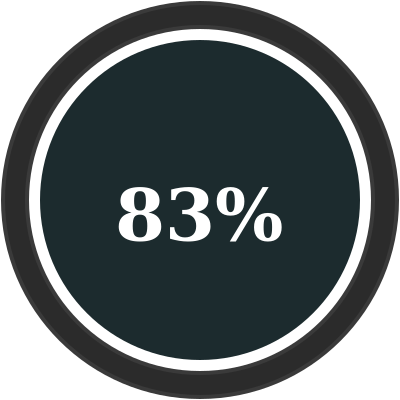
Report being more productive
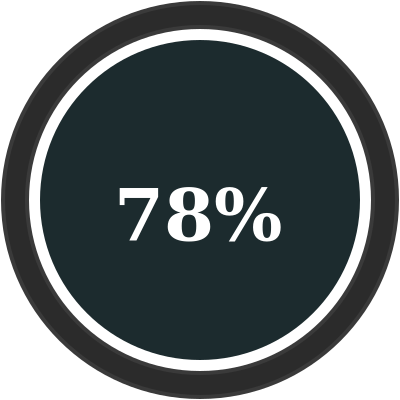
Of sellers said Copilot helps them stay in the flow of work

Report being able to spend more time with customers
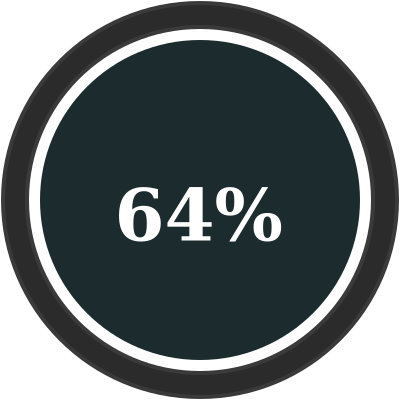
Said they were able to better personalize customer engagements

Say they find CRM information they need faster

Said it reduces the amount of administrative work they must do
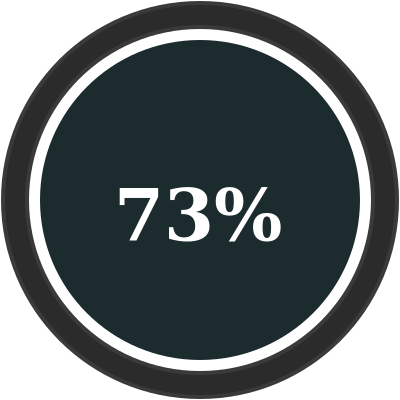
Said they can complete tasks more easily


From January to March 2024, Gartner conducted a survey of 1,026 B2B sellers to identify the skills necessary for success in an evolving B2B landscape.
Sellers who effectively partner with AI tools are 3.7 times more likely to meet quota than those who do not, according to a survey by Gartner, Inc. 2
According to Microsoft research 3, selling is becoming increasingly challenging, with 79% of sellers reporting that they need to support more accounts and spend 70% of their time on administrative tasks like research, planning, generating proposals, data entry, and internal meetings.
Microsoft Copilot can assist sellers in various ways to enhance their productivity and efficiency by optimizing these tasks:
Unlock sales productivity
With AI-generated emails, sumaries and content.
Personalize customer intercations
With AI-assisted insights and recommendations.
Stay in the flow of work
With integrated data between Microsoft 365 apps and your CRM.
1 - 2023 Microsoft Business Trends Survey of 4,500 business decision makers (BDMs) in the United States, the United Kingdom, and Japan
2 - "The New High-Performing Seller. Essential skills to supercharge your sales force" by Gartner
3 - Microsoft-sponsored Futurum Research. 2022.


1. Ride the wave of excitement
Sellers quickly recognized the value of Microsoft Copilot for Sales, sparking significant excitement. When rolling out Microsoft Copilot for Sales to your team, prioritize visibility. As excitement builds, it will naturally drive adoption among your motivated salespeople. Foster this enthusiasm to create early champions.
2. Align enablement with your employees’ needs
It’s perfectly fine if not everyone is a self-motivated early adopter! Effective change management begins with understanding your audience. We suggest creating hero scenarios for each user persona by closely examining their challenges, sales processes, and daily tasks. Review their role descriptions and documentation to understand their goals.
3. Engage leadership at every level
Enthusiastic support from executives is crucial, especially when introducing new technology. Leaders not only guide and motivate their teams but also allow time and prioritize learning. Actively cultivate this support from the start.
4. Ensure your underlying data policies are secure
Initiating reviews across several key areas is essential. This includes HR, legal, security, and the IT team responsible for safeguarding your data estate. Within your sales teams, administrators might have concerns about access. If so, encourage them to perform a comprehensive security and role review.
5. Start simple and work up from there
We recommend that salespeople begin with meeting and email summarization features. They might not be ready to fully trust email drafting tools yet, but by seeing how the summarization works, they’ll gain insight into how Microsoft Copilot for Sales processes information
6. Prioritize CRM data resilience
CRM data helps sales managers make informed decisions, accurate forecasts, and understand attrition. The value of CRM data management is immense. Sellers should use Microsoft Copilot for Sales in Teams and Outlook to update CRM contacts, promoting data accuracy without re-entering information.
7. Practice effective prompting
Just like any skill, the more you practice prompting, the more intuitive it becomes. Keep at it, and you’ll find it gets easier and more effective over time.
Sellers quickly recognized the value of Microsoft Copilot for Sales, sparking significant excitement. When rolling out Microsoft Copilot for Sales to your team, prioritize visibility. As excitement builds, it will naturally drive adoption among your motivated salespeople. Foster this enthusiasm to create early champions.
2. Align enablement with your employees’ needs
It’s perfectly fine if not everyone is a self-motivated early adopter! Effective change management begins with understanding your audience. We suggest creating hero scenarios for each user persona by closely examining their challenges, sales processes, and daily tasks. Review their role descriptions and documentation to understand their goals.
3. Engage leadership at every level
Enthusiastic support from executives is crucial, especially when introducing new technology. Leaders not only guide and motivate their teams but also allow time and prioritize learning. Actively cultivate this support from the start.
4. Ensure your underlying data policies are secure
Initiating reviews across several key areas is essential. This includes HR, legal, security, and the IT team responsible for safeguarding your data estate. Within your sales teams, administrators might have concerns about access. If so, encourage them to perform a comprehensive security and role review.
5. Start simple and work up from there
We recommend that salespeople begin with meeting and email summarization features. They might not be ready to fully trust email drafting tools yet, but by seeing how the summarization works, they’ll gain insight into how Microsoft Copilot for Sales processes information
6. Prioritize CRM data resilience
CRM data helps sales managers make informed decisions, accurate forecasts, and understand attrition. The value of CRM data management is immense. Sellers should use Microsoft Copilot for Sales in Teams and Outlook to update CRM contacts, promoting data accuracy without re-entering information.
7. Practice effective prompting
Just like any skill, the more you practice prompting, the more intuitive it becomes. Keep at it, and you’ll find it gets easier and more effective over time.


Verdane
To enhance operational efficiency and maintain a competitive edge, Verdane, one of the Nordic’s largest private equity firms, embarked on an AI integration journey. Teaming up with SoftwareOne, Verdane sought to leverage the transformative power of Microsoft Copilot. This collaboration aimed to streamline processes, empower teams, and revolutionize the way Verdane conducts market research, pitches to potential partners, and ultimately, solidifies its position as an industry leader in sustainable investments.
Spirax Group
A global leader in industrial engineering, Spirax Group sought our help to enhance its colleague experience by addressing inefficiencies in how employees managed documentation, meetings, and information retrieval. With a workforce spread across multiple continents and time zones, the challenge was not only to help Spirax Group colleagues work more productively, but also to ensure that teams could collaborate more effectively, regardless of their location.
Outcomes
- Significant time savings: all participants reported saving at least 20-30 minutes per week, with some “power users” saving up to 11 hours weekly
- Increased productivity through more automation enables employees to reallocate their time to more strategic activities
- Improved employee satisfaction and reduced stress
- Enhanced collaboration and informed decision-making

Did you know that:
- Microsoft Copilot for Microsoft 365 is compliant with the existing privacy, security, and compliance commitments to Microsoft 365 commercial customers, including the General Data Protection Regulation (GDPR) and European Union (EU) Data Boundary.
- Prompts, responses, and data accessed through Microsoft Graph aren't used to train foundation LLMs, including those used by Microsoft Copilot for Microsoft 365.
- Microsoft Copilot for Microsoft 365 operates with multiple protections, which include, but are not limited to, blocking harmful content, detecting protected material, and blocking prompt injections (jailbreak attacks).
Implementing Microsoft Copilot can significantly boost productivity and efficiency within your organization. However, addressing data security concerns is crucial to ensure a safe and compliant environment. By adopting robust security measures and preparing your organization thoroughly, you can leverage the full potential of Microsoft Copilot while safeguarding your data.
Microsoft Copilot for Microsoft 365 documentation.
Data, Privacy, and Security for Microsoft Copilot for Microsoft 365.
Understanding data security concerns
- Data Privacy: Copilot accesses and processes vast amounts of data to provide intelligent assistance. Ensuring that sensitive information remains confidential is crucial.
- Data Integrity: Maintaining the accuracy and consistency of data during processing is essential to prevent misinformation.
- Access Control: Properly managing who has access to what data within Copilot is vital to prevent unauthorized access.
- Compliance: Adhering to industry standards and regulations, such as GDPR, is necessary to avoid legal repercussions.
Strategies to address data security concerns
- Implement Zero Trust Principles: Adopt a Zero Trust security model, which assumes that threats could be both external and internal. This involves verifying every access request as though it originates from an open network.
- Use Sensitivity Labels: Apply sensitivity labels to classify and protect data based on its level of sensitivity. This helps in managing access and ensuring that sensitive data is handled appropriately.
- Data Loss Prevention (DLP): Implement DLP policies to monitor and protect sensitive information from being shared inadvertently or maliciously.
- Regular Audits and Monitoring: Conduct regular security audits and continuously monitor data access and usage to detect and respond to potential threats promptly.
- Employee Training: Educate employees about data security best practices and the importance of adhering to security protocols when using Copilot.
Preparing your organization for Microsoft Copilot
- Assess Readiness: Evaluate your current IT infrastructure and security policies to ensure they are robust enough to support Copilot.
- Update Policies: Revise your data security policies to include guidelines specific to the use of AI tools like Copilot.
- Optimize for Search: Enhance your data organization and search capabilities to maximize the efficiency of Copilot.
- Pilot Testing: Start with a pilot implementation to identify potential issues and gather feedback before a full-scale rollout.