SoftwareOne logo

Copilot in HR: Best Practices and Strategies Copilot as your AI assistant

Copilot in HR: Best Practices and Strategies Copilot as your AI assistant

Copilot is a powerful tool that can significantly improve HR processes, from recruitment to employee development. By leveraging its capabilities, HR professionals can enhance decision-making and create a more efficient and effective workplace.

Copilot can streamline the daily tasks of HR professionals. Explore key scenarios and discover how Copilot can be your AI assistant throughout the process.

1. How Copilot can simplify HR tasks

The future of HR is here, with AI taking center stage. Use Microsoft Copilot for Human Resources to expedite recruitment processes for elite talents, align new recruits effortlessly while customizing their experiences, keep your workers happy and inspired all the time, and make HR-style decisions based on numbers through Copilot’s big data platform


ai-hr-tips-adobe-40545833-square

Copilot scenarios for HR

  • sync settings icon

    Overwiew and KPIs

    KPIs play a crucial role in organizations, providing a compass to navigate toward success. Let's dive into KPIs for Human Resources and how Copilot can assist.

  • accessibility tools icon

    Crayon Case Studies

    See how real-life HR employees are using Copilot in their day to day.

  • head profile icon

    Use case by Role

    Copilot can simplify the tasks that execs perform every day. Look at key use cases and how Copilot can be your AI assistant along the way.

guide-ola-adobe-917104118-square

Using Copilot in HR

Goals and Challenges

With changing worker expectations, multi-generational workforces, and hybrid workplaces it’s becoming harder to keep talented people. AI is transforming HR by enabling predictive learning. Copilot can help to simplify access to data, improve quality and increase creativity, resulting in improvements to essential key performance indicators.

  • Improve organizational agility
  • Transform employee experiences
  • Optimize HR programs
  • Discover workforce insights

Copilot can assist you with...

Copilot helps you improve retention, while reducing costs by improving organizational agility, optimizing HR programs, using workforce insights, and transforming employee experiences.

  • Managing internal job transitions
  • Streamline your recruiting process
  • Improved benefits and compensation processes
  • Resolving employee issues

HR Roles

  • Talent acquisition
  • HR compliance
  • Planning and business alignment
  • Employee development

Microsoft Copilot opportunity to impact key Industry KPIs

  • money icon

    Cost per Hire

    Employees improve the hiring process by using Copilot to help write job descriptions, summarize interviews, avoid bias when identifying top candidates, improve candidate communications, and improve onboarding processes.

  • profile icon

    Employee Turnover Rate

    Copilot can help all employees get more satisfaction in their job by reducing boring or stressful tasks, work on higher value activities. It also makes many tasks faster, which can reduce overtime requirements.

  • speed icon

    Improved Onboarding Time

    Copilot can speed up the onboarding process by simplifying access to information and training, helping new employees become productive more quickly.
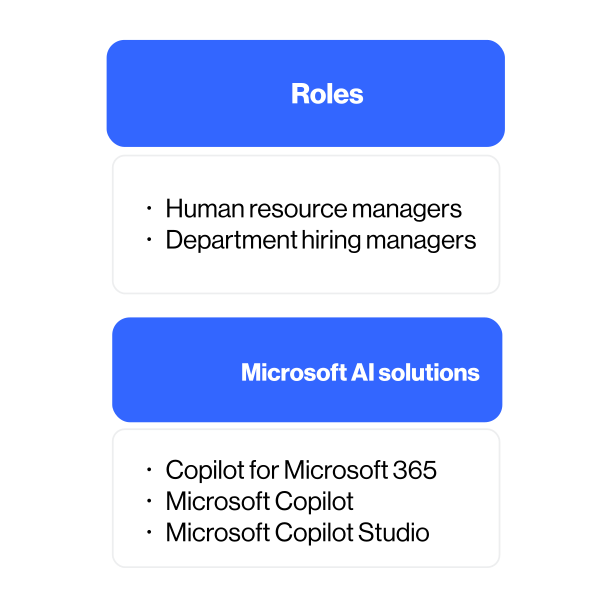
2. Microsoft Copilot: Enhancing KPI Performance

Enhance your department’s KPI performance with the advanced features of Microsoft Copilot. Transform the hiring process by utilizing Copilot to develop precise job descriptions, generate clear interview summaries, identify top candidates without bias, improve candidate interactions, and streamline onboarding processes.


ai-hr-tips-adobe-928384660-square

KPI - Cost per Hire

ai-hr-tips-strategies-Artboard 4

Recruitment and Employee Experience Improvements

  • Improve quality of recruitment experience and materials
  • Improve job descriptions
  • Improve interviews with summarization and recap
  • Improve quality of emails and chats with candidates

Improve employee meetings

  • Organize information from past interactions
  • Completely focus during the meeting

Create internal feedback loop

  • Draft candidate and new employee surveys
  • Analyze surveys to gain valuable insights into what makes employees happy or areas that need improvement within the organization

KPI- Employee Turnover Rate

ai-hr-tips-strategies-Artboard 6

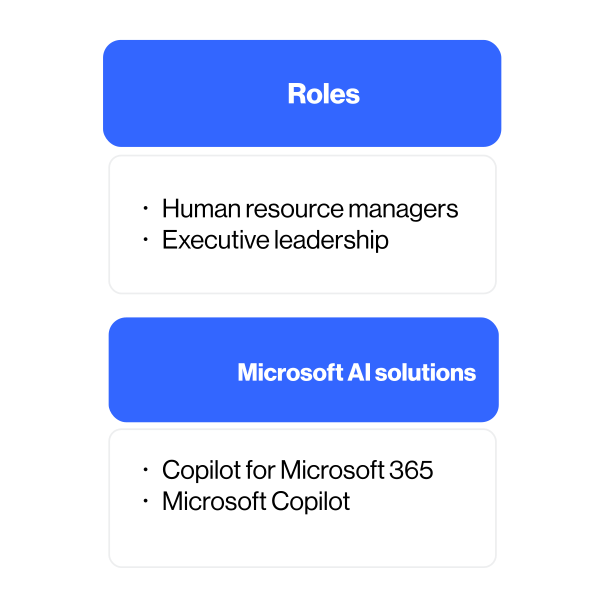
How Copilot can help employee turnover rates

Reducing the stress of everyday tasks by using Microsoft Copilot to reduce complexity and save time can help to improve employee satisfaction, which has been shown to improve retention.
Save time

  • Simplify processes and reduce mundane tasks
  • Reduce stress by creating a first draft for difficult emails and documents
  • Keep work organized
  • Reduce overtime requirements

Foster a productive culture

  • Draft and analyze employee surveys
  • Improve benefit discoverability and usage
  • Make internal announcements more impactful


KPI – Improve Onboarding Time

ai-hr-tips-strategies-Artboard 5

How Copilot can help reduce onboarding time

Reducing ramp up time is beneficial for everyone. It boosts employee confidence and engagement. It helps shorten the learning curve allowing employees to make an impact sooner.
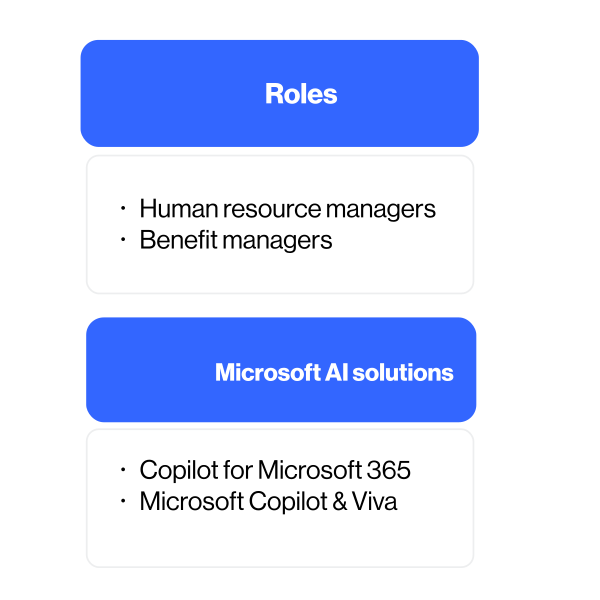
Create onboarding materials

  • Use Copilot to draft training guides
  • Use Copilot to enhance employee handbooks

Improve onboarding process

  • Generate onboarding documents and contracts
  • Integrate relevant company policies and resources into the onboarding materials
  • Draft check-in emails to new hires to send during the first 60 days on the job

KPI – Employee Net Promoter Score

ai-hr-tips-strategies-Artboard 8

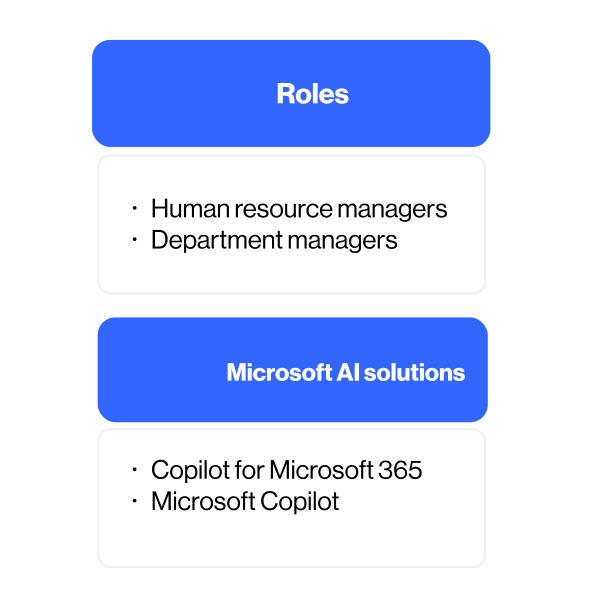
How Copilot can help improve eNPS scores

Employee Net Promoter Score (eNPS) is a valuable metric for assessing employee engagement.

It measures how likely your employees are to recommend your organization as a great place to work to their friends or family. Microsoft Copilot plays a pivotal role in enhancing employee Net Promoter Scores (eNPS) by fostering a positive work environment and empowering employees.
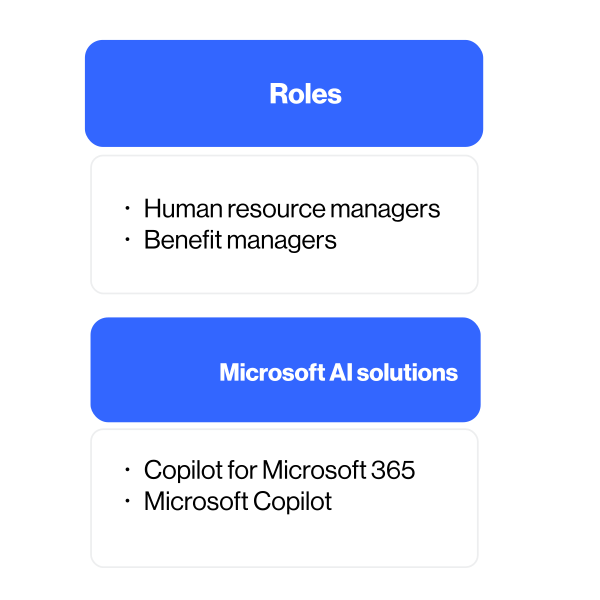
Create internal feedback loop

  • Draft employee surveys
  • Analyze surveys to gain valuable insights into employee sentiment

Automate repetitive tasks

  • Get to first draft faster by leveraging Copilot and Copilot in Word; reclaim time for creative and strategic projects

Improve All Hands and Team meetings

  • Prepare for the meeting
  • Focus during the meeting with Teams recap and transcription
  • Generate follow‑up communications

KPI – Benefit Usage

ai-hr-tips-strategies-Artboard 7

How Copilot can help increase benefit usage

Create improved interfaces for employees to learn about their benefits and improve registration processes.

Create HR benefit campaign

  • Generate news and announcements from your HR team or department
  • Communicate policies and procedures for HR-related matters, such as benefits, payroll, performance, and compliance

Improve the quality of benefit materials

  • Create forms and workflows for HR-related requests, such as leave, expense, feedback, and recognition
  • Surface learning opportunities and resources for employees

Improve benefits information sessions

  • Use meeting recap
  • Generate follow-up communications

3. Microsoft is reinventing Human Resources with Microsoft Copilot

In the digital age, the role of Human Resources is evolving rapidly. Microsoft’s latest initiative showcases a pioneering leap in HR management, leveraging the power of AI to revolutionize how HR services are delivered. This transformation is not just about adopting new technologies but also about reimagining the HR experience for employees worldwide.


ai-hr-tips-adobe-316026049-square
ai-hr-tips-mage-04534

AI-Powered HR

Microsoft HR embarked on a three-year journey in January 2023 to build a best-in-class HR Tech ecosystem, leveraging Microsoft Copilot and other AI technologies.

Pilot Program

The program initially targeted roles with significant administrative tasks such as HR Shared Services, Learning, and Recruiting, and later expanded to strategic roles like Compensation and HR Business Partners.

Objectives

The goals are to increase productivity, improve employee experience, and reduce costs across tech, operations, and infrastructure.

Adoption and Onboarding

A cross-HR team called AI Orchestration, Adoption, and Impact (OAI) was formed to implement an adoption program for these AI tools

ai-hr-tips-adobe-561628743-square

Technology Integration

The HR team previously relied on a fragmented ecosystem of 108 tools and 50 shadow applications. The initiative aimed to reduce manual transactions and enhance strategic responsibilities.

Microsoft HR Transformation

In one year, Microsoft HR has transformed its approach to support and empower its global workforce of over 190,000 employees across 109 countries.

People Vision 2030

This initiative aspires to make Microsoft the most thriving, digitally-enabled, and diverse company on the planet.

Outcome

Early results from Copilot for Microsoft 365 and Copilot for Dynamics 365 deployments demonstrate how rapidly Copilots can deliver value.
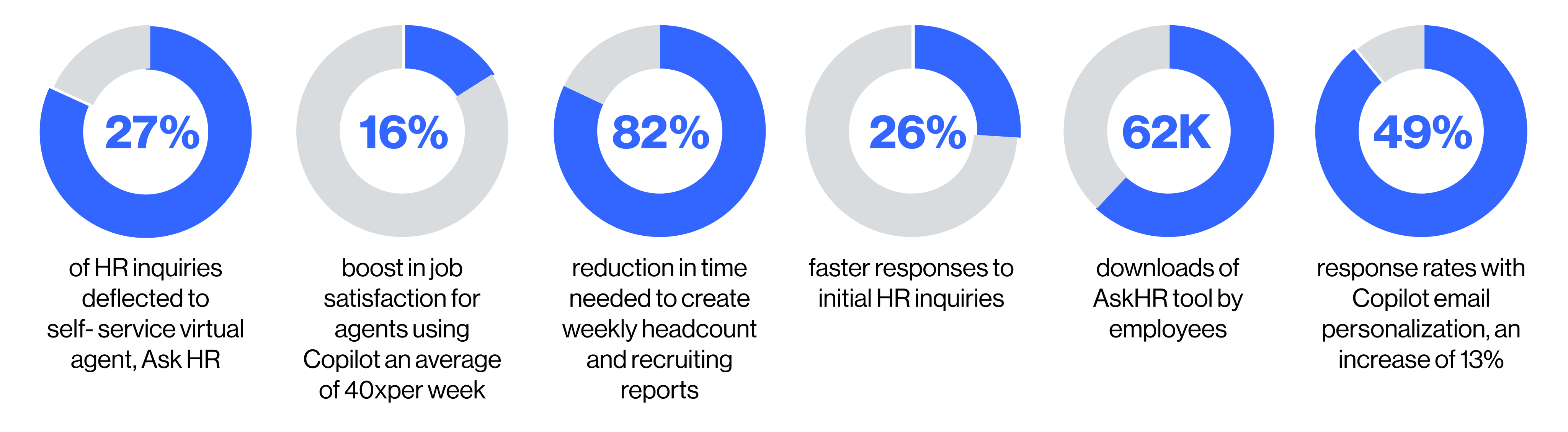
ai-hr-tips-strategies-Artboard 1_1

These improvements demonstrate Copilot’s potential to enhance productivity, improve employee experiences, and reduce operational costs. If you’re considering implementing Copilot in your HR department, these areas could be a great starting point to measure its impact on your organization’s KPIs1.

https://news.microsoft.com/wp-content/uploads/prod/sites/658/2024/05/How-Microsoft-is-reinventing-HR-with-Microsoft-Copilot.pdf

4. Effective HR Scenarios powered by Copilot

Boost value through consistent usage and personal productivity, optimizing functional workflows, and impacting the metrics that are vital to your organization. Streamline HR processes to enhance efficiency and drive better results. Utilize data-driven insights to make informed decisions that align with your strategic goals.


ai-hr-tips-adobe-498832610-square

Streamline your recruiting processes

ai-hr-tips-strategies-Artboard 11

Streamline benefits and compensations

ai-hr-tips-strategies-Artboard 2

5. Boost your productivity. Explore key Copilot scenarios for HR

Using Microsoft Copilot to streamline everyday tasks can reduce complexity, save time, and boost employee satisfaction. Discover how Copilot can be your AI assistant throughout the process.


ai-hr-tips-adobe-419848127-square

Managing internal job transitions

ai-hr-tips-strategies-Artboard 3

Resolving employee issues

ai-hr-tips-strategies-Artboard 13

6. Copilot empowering human achievements

In the past year, Microsoft Copilot has been adopted by hundreds of companies worldwide, driving significant AI-powered transformations. These advancements have delivered measurable business value and notable outcomes.


ai-hr-tips-adobe-123177076-square

Last year Microsoft introduced the term “AI Transformation.” It’s remarkable to think that back then, Copilots were not widely available, and the Azure OpenAI Service had only been around for six months. As Satya Nadella, Microsoft Chairman and CEO, mentioned in the last quarter’s earnings report, 60% of the Fortune 500 companies have now adopted Copilots, and 65% are using the Azure OpenAI Service. Today, Copilot is at the forefront of how AI is driving human achievement 1.

One notable example is Chi Mei Medical Center in Taiwan, which leveraged AI copilots developed using Microsoft Azure OpenAI Service to address the country's healthcare worker shortage. By implementing these copilots across various operations and patient interactions, the medical center has seen remarkable improvements. Doctors now spend just 15 minutes, down from an hour, writing medical reports. Nurses can document patient information in under 5 minutes per patient, compared to the previous 10 to 20 minutes. Pharmacists have doubled their daily patient intake from 15 to 30 by utilizing a copilot for comprehensive clinical summaries across multiple databases. This innovative approach has allowed staff to dedicate more time to patient care and outcomes, while also reducing burnout and stress.

Unum Group, a leading provider of workplace benefits and services, aimed to enhance the employee experience by streamlining the traditionally manual and time-consuming process of retrieving policy information for its client support center. Using Azure OpenAI Service, the company developed an application capable of searching 1.3 terabytes of data with 95% accuracy, reducing response times to just four to five seconds and significantly boosting efficiency and customer satisfaction. This AI-driven tool addresses 75% of contract-related inquiries, allowing employees to focus on providing personalized solutions and interacting more meaningfully with clients. The tool has gained strong trust among employees, with over 90% of support center staff now using it, reporting that it has improved their work experience.

Looking back on FY24: from Copilots empowering human achievement to leading AI Transformation - The Official Microsoft Blog

Lumen Technologies was one of the early adopters of Microsoft Copilot, launching Copilot for Microsoft 365 last August. Since then, the company has expanded its use of Copilot across the organization to streamline workflows and foster a forward-thinking culture. Today, Copilot for Sales is saving its 3,000-plus sales team members an average of four hours per week, translating into $50 million in annual savings. This allows sellers to spend more time with customers, enhance their work-life balance, and transform the way they work.

Insights from Early Copilot Users

  • ai-hr-tips-images-13

    Copilot early users said they were more productive

  • ai-hr-tips-images-11

    Faster overall in a series of tasks (searching, writing, and summarizing)

  • ai-hr-tips-image77

    Said they didn’t want to give it up

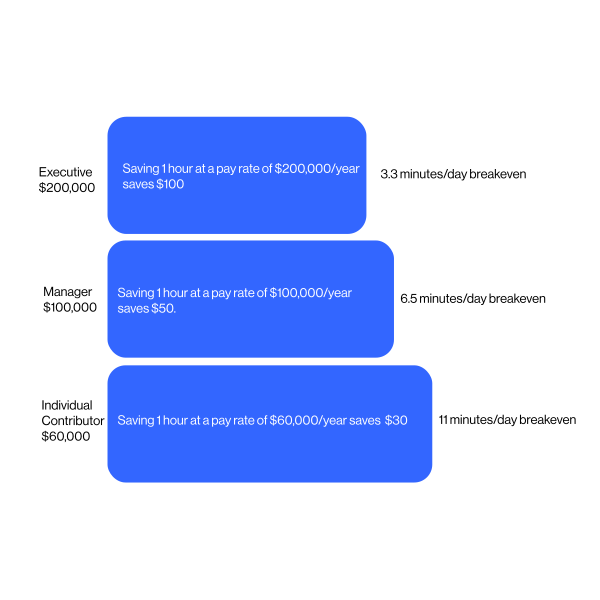
7. How fast you can recover the cost of Copilot?

Assumes 2,000 hours per year and 22 days/month worked and a cost of $30/month for the Copilot license and only converting 25% of time savings to value benefits.


ai-hr-tips-strategies-Artboard 14

8. Crayon Copilot Use Cases

Discover the latest Crayon Copilot Case Studies. Learn how companies have successfully leveraged Crayon’s expertise for AI integration, enhancing productivity and competitiveness with Microsoft Copilot.


ai-hr-tips-dobe-674439-square

Verdane

To enhance operational efficiency and maintain a competitive edge, Verdane, one of the Nordic’s largest private equity firms, embarked on an AI integration journey. Teaming up with Crayon, Verdane sought to leverage the transformative power of Microsoft Copilot. This collaboration aimed to streamline processes, empower teams, and revolutionize the way Verdane conducts market research, pitches to potential partners, and ultimately, solidifies its position as an industry leader in sustainable investments.

Spirax Group

A global leader in industrial engineering, Spirax Group sought our help to enhance its colleague experience by addressing inefficiencies in how employees managed documentation, meetings, and information retrieval. With a workforce spread across multiple continents and time zones, the challenge was not only to help Spirax Group colleagues work more productively, but also to ensure that teams could collaborate more effectively, regardless of their location.


Outcomes

  • Significant time savings: all participants reported saving at least 20-30 minutes per week, with some “power users” saving up to 11 hours weekly
  • Increased productivity through more automation enables employees to reallocate their time to more strategic activities
  • Improved employee satisfaction and reduced stress.
  • Enhanced collaboration and informed decision-making.

9. Addressing Data Security Concerns with Microsoft Copilot


As organizations increasingly adopt AI-powered tools like Microsoft Copilot, ensuring data security becomes paramount. Microsoft Copilot integrates with Microsoft 365 Apps and uses large language models (LLMs) to enhance productivity. However, this integration raises valid concerns about data privacy and security. Here’s how to address these concerns and prepare your organization for a seamless implementation of Microsoft Copilot.

ai-hr-tips-adobe-348868457-square

Did you know that:

  1. Microsoft Copilot for Microsoft 365 is compliant with the existing privacy, security, and compliance commitments to Microsoft 365 commercial customers, including the General Data Protection Regulation (GDPR) and European Union (EU) Data Boundary.
  2. Prompts, responses, and data accessed through Microsoft Graph aren't used to train foundation LLMs, including those used by Microsoft Copilot for Microsoft 365.
  3. Microsoft Copilot for Microsoft 365 operates with multiple protections, which include, but are not limited to, blocking harmful content, detecting protected material, and blocking prompt injections (jailbreak attacks).
ai-hr-tips-adobe-377875818-image

Implementing Microsoft Copilot can significantly boost productivity and efficiency within your organization. However, addressing data security concerns is crucial to ensure a safe and compliant environment. By adopting robust security measures and preparing your organization thoroughly, you can leverage the full potential of Microsoft Copilot while safeguarding your data.

Microsoft Copilot for Microsoft 365 documentation
Data, Privacy, and Security for Microsoft Copilot for Microsoft 365

Understanding Data Security Concerns

  1. Data Privacy: Copilot accesses and processes vast amounts of data to provide intelligent assistance. Ensuring that sensitive information remains confidential is crucial.
  2. Data Integrity: Maintaining the accuracy and consistency of data during processing is essential to prevent misinformation.
  3. Access Control: Properly managing who has access to what data within Copilot is vital to prevent unauthorized access.
  4. Compliance: Adhering to industry standards and regulations, such as GDPR, is necessary to avoid legal repercussions.

Strategies to Address Data Security Concerns

  1. Implement Zero Trust Principles: Adopt a Zero Trust security model, verifying every access request as though it originates from an open network.
  2. Use Sensitivity Labels: Apply sensitivity labels to classify and protect data based on its sensitivity level.
  3. Data Loss Prevention (DLP): Implement DLP policies to monitor and protect sensitive information from accidental or malicious sharing.
  4. Regular Audits and Monitoring: Conduct regular security audits and continuously monitor data usage to detect threats promptly.
  5. Employee Training: Educate employees on data security best practices and the importance of following security protocols.

Preparing Your Organization for Microsoft Copilot

  1. Assess Readiness: Evaluate your IT infrastructure and security policies to ensure they can support Copilot.
  2. Update Policies: Revise data security policies to include guidelines for using AI tools like Copilot.
  3. Optimize for Search: Improve data organization and search capabilities to maximize Copilot’s effectiveness.
  4. Pilot Testing: Begin with a pilot rollout to identify potential issues and collect feedback before full deployment.
An abstract image of a green spiral tunnel.

Connect with our experts

Share a few details about your business challenge, and we’ll get right back to you.

Connect with our experts

Share a few details about your business challenge, and we’ll get right back to you.